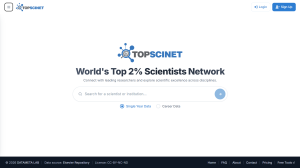


TOPSCINET adds a small badge next to a researcher’s name on Google Scholar profiles if they are included in Stanford/Elsevier’s global Top 2% Scientists list. Install the extension for your browser below to start seeing badges as you browse Scholar.
Why install it:
- Instantly identify Top 2% Scientists while browsing Google Scholar, with no manual lookups needed.
- Available across all three major browsers — Chrome, Firefox, and Edge — with the same lightweight badge experience.
- Free to use, and works automatically in the background on Scholar profile pages.
- Helps researchers, students, and institutions quickly benchmark authors during literature review or collaboration searches.



The browser extension automatically detects when you’re viewing a researcher’s Google Scholar profile and displays a small badge if that researcher appears on the Top 2% Scientists list.
Download
Google Chrome: https://chromewebstore.google.com/detail/topscinet-top-2%-scientis/jjnfahjhammibochacphpbonhfiagooe
Mozilla Firefox: https://addons.mozilla.org/en-US/firefox/addon/topscinet-top-2-scientist/
Microsfot Edge: https://microsoftedge.microsoft.com/addons/detail/topscinet-top-2-scienti/gpkahniacfnnhbdeajhfihilacgefggm
Searchable Database for Top 2% Scientists
Visit TOPSCINET.com
If your name appears in the search results, claim your profile using your institutional email to update your social media links and enhance your online presence.